I remember the first time I tried to automate lead qualification: it felt like trying to teach a barista how to comfort a customer while also operating a high-speed espresso machine. The risk was obvious — speed without empathy turns prospects cold, and personalization without scale stalls growth. Over the last few years I’ve built and refined a stack that balances automation and human touch using OpenAI, Zapier, and HubSpot. Below I walk you through how I stitch these tools together, practical prompts and workflows I use, and the guardrails that help preserve authenticity and compliance.
Why combine OpenAI, Zapier and HubSpot?
Each tool brings a clear strength:
Together, they allow me to qualify leads faster, prioritize high-value opportunities, and hand off to sales at the right moment — all while keeping messages warm and human.
Core principles I follow
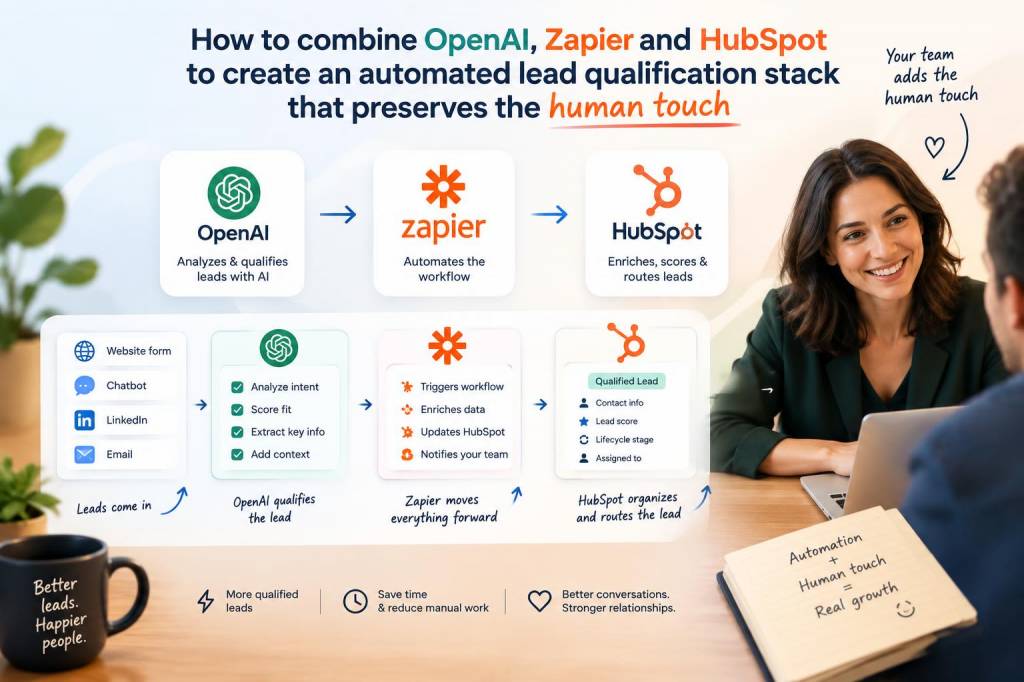
High-level workflow I use
Here’s the basic flow I implement in Zapier:
| Trigger | HubSpot form submission / New contact / Visit high-value page |
| Action | Zapier sends relevant data to OpenAI for intent and qualification scoring |
| Conditional | Zapier routes results: mark as Marketing Qualified Lead (MQL), Sales Ready, or Nurture in HubSpot |
| Action | Automated email or Slack notification to salesperson; create task in HubSpot for human follow-up |
What I send to OpenAI (and why)
Quality in requires quality out. I include:
Then I craft a prompt asking the model to:
Example prompt I use
Below is a simplified version of a prompt I use in Zapier to call OpenAI. I place this in the Zap step that sends data to the OpenAI API:
“You are an expert B2B sales assistant. Given the contact information and context, return a JSON object containing: qualification_score (0-100), intent (buy_now / researching / competitor / not_interested), top_pain_points (comma-separated), recommended_next_step (call / email / nurture), and a short personalized outreach message under 150 words that a salesperson can send. Use the following facts: [INSERT HUBSPOT PROPERTIES AND FORM ANSWERS]. Base score more heavily on budget, timeline, and company size. If the contact mentions pricing or procurement, increase score. If the contact is from a free email domain (gmail, yahoo), reduce score. Respond only with valid JSON.”
Zapier setup tips
HubSpot properties and lifecycle handling
I create custom HubSpot properties:
When the Zap processes a lead, it updates these properties and changes lifecycle stage if thresholds are met. For instance, score >75 + clear buying timeline → change to Sales Qualified Lead and create a task for an SDR.
Preserving the human touch in messaging
Automation can draft the first message, but I always include one of these tactics:
Monitoring, validation and continual improvement
I track key metrics in a simple spreadsheet or HubSpot dashboard:
Every month I review incorrectly scored leads and refine the prompt, weighting and filters (e.g., adjust for specific industries that tend to under/over-index).
Data protection and compliance
Don’t underestimate GDPR and data residency constraints. I do the following:
Common pitfalls and how I avoid them
If you’re starting from scratch, build a simple Zap: HubSpot form → OpenAI scoring → update HubSpot property → notify salesperson. From there, iterate: add filters, improve prompts, introduce handoff tasks, and track outcomes. The goal is not to remove humans but to amplify their impact — get the right leads to the right person faster, and keep the conversation genuinely human.